Bastion OS: Phase I


"My main task here is to create bootable efi application for the kernel, build the kernel skeleton, and set up the entry point for both archs"
Project skeleton
So, first of all let's look at the project skeleton - it's very similar to Linux's. Of course, some details here will change in the future.
/ — Project Root
Top-level Makefile, config.mk (shared toolchain), .config
boot/ — UEFI Boot Loader
PE32+ .efi application that loads the kernel
-
boot/common/— Architecture-independent code- ELF parser
- Boot sequence: GPO, memory map, ACPI/FDT discovery
- ExitBootServices()
-
boot/x86_64/— x86_64-specific- EFI entry point and PE linker script
-
boot/aarch64/— AArch64-specific- EFI entry point and PE linker script
configs/ — Kernel default configurations
doc/ - Kernel documentation
include/ — Shared Headers
include/boot/— Single shared contract between loader and kernel and efi defenitioninclude/elf/- ELF format defenitioninclude/kernel/— Additional shared kernel headers
kernel/ — The Kernel (ELF64)
-
kernel/arch/— Architecture-specific implementationskernel/arch/x86_64/— Assembly entry, linker script, arch-specific codekernel/arch/aarch64/— Assembly entry, linker script, arch-specific code
-
kernel/core/— Architecture-independent kernel logic- Entry, banner, memory map dump, Hello world
-
kernel/lib/— Freestanding support libraries (strings, cxxabi...) -
kernel/include/— Kernel-internal headers -
kernel/drivers/— Device drivers -
kernel/fs/— Filesystem implementations -
kernel/mm/— Memory management- PMM (Physical Memory Manager)
- VMM (Virtual Memory Manager)
- Heap
-
kernel/loader/— Userspace ELF loader
scripts/ — Build & Run Helpers
-
configure.py— Linux-style config system- Converts
.config→config.h+config_generated.mk
- Converts
-
create_disk.sh— Disk image creation- Creates 64 MiB GPT/FAT32 disk image
- Includes
.efiandkernel.elf
-
run_qemu.sh— QEMU launcher- Finds OVMF/AAVMF firmware
- Launches QEMU
result/ — Result Output (generated, ignored by git)
{arch}/bastion.img— Image for run in QEMU{arch}/boot/— directory with efi application{arch}/kernel/— directory with ELF kernel
BOOT Options
Legacy Boot
The legendary old method using a magic number in the MBR. It's inconvenient to work with; i plan to add support of it, but not today.
Limine
https://github.com/limine-bootloader/limine
A good bootloader, but i decided it's to easy and not nearly as fun to use ready-made bootloader.
U-BOOT
A great bootloader. On ARM there are almost no other options.
Roughly speaking u-boot has 3 ways to boot a kernel:
- U-Boot own protocol. Loads a flat binary or uImage. Passes dt to X0 and runs it
- booti/bootm commands. Loads a Linux-format Image with a header and passes device tree pointer
- U-Boot as UEFI firmware
It would take a very long time to add support for uImage (though I do want to eventually), and it feels wrong to use the Linux format. So UEFI is the best and most universal option here.
GRUB
Same story as Limine. GRUB can also run UEFI applications, so supporting the GRUB format isn't necessary in the early stages.
GRUB multiboot
There is interesting thing, that called grub multiboot. (For example, this hobby kernel uses it)
It's the thing, that can run kernels. But it has some moments:
1) Multiboot requires special header (not big problem, UEFI`s PE32+ need it too)
2) Special calling convention - Multiboot passes boot info in EAX/EBX (magic + Multiboot info struct pointer)
3) Multiboot1 enters in 32-bit protected mode - Long mode is not set up. We need a 32->64 bit trampoline. Multiboot2 has a 64-bit EFI handoff tag, but that's a different path.
4) Multiboot is x86-only
5) We haven't BootInfo, like i will have in UEFI
UEFI Booting
Unified Extensible Firmware Interface. Absolutely best way to boot kernel. Easy and powerfull. I`ll use it for booting my kernel.
So, first of all, let's talk about how Linux boots with UEFI.
Linux has an EFI stub. When you build the kernel with CONFIG_EFI_STUB=y, the final vmlinuz becomes PE32+ executable (https://docs.kernel.org/admin-guide/efi-stub.html). Linux writes hand-crafted PE32+ header into it, and UEFI can successfully read it directly.
In short, this EFI stub does basic things, like getting memory map, loading initrd and then jumps to real kernel. With GRUB it's the same idea: UEFI firmware -> GRUB (EFI app) -> Linux EFI stub -> real kernel.
With UEFI we don't care about checking hardware, entering long-mode and other.
With my kernel situation is a bit more complex. It compiles to ELF format, and I don't add PE32+ header. Because of that, I split booting into two files:
1) loader.efi - EFI application, that do all efi stuff and jumps to kernel file
2) kernel.elf - the kernel itself
This approach comes with a couple of trade-offs:
- I need to two files instead of one.
- I need Clang, because it can directly target PE32+ via
-target x86_64-unknown-windows. GCC can also produce PE32+ binaries through a MinGW cross-toolchain, but Clang is more convenient here since it's a single cross-compiler for all targets without a separate binutils setup.
For now, i`ll live with this. But in ideal world, I'd like to generate the PE32+ header directly in code (like Linux does) and remove clang dependency.
Boot chain
OK, i've decided to use UEFI. Let's walk through boot chain.
1) UEFI firmware loads loader.efi
2) Get EFI_HANDLE and EFI_SYSTEM_TABLE pointers (passed from UEFI firmware).
3) Open the kernel ELF file from the EFI partition (via efi protocols)
4) Read, parse and validate ELF64 header of kernel file
5) Iterates via PT_LOAD segments, calculate total memory footprint for kernel
6) Allocate memory pages via UEFI for pt_load. And then copy all segment to new memory
6) Find firmware tables (RSDP or FDT)
7) Get Memory Map
8) Call ExitBootServices (UEFI Point of No Return)
9) Convert UEFI Memory Map to our format
10) Fill BootInfo structure (magic value, memory_map, addresses of kernel entry point)
11) Jump to real kernel
That was a short description of boot chain. Now let's go through each step and look at the implementation.
Boot Implementation
UEFI Loads loader.efi
This part is straightforward. I just create linker.ld file, where sets ENTRY(efi_main), and lays out segments (.text, .data, .bss .dynamic and etc) with 4KiB alignment. Linker scripts are same for both architectures.
All magic is done by clang with -target x86_64_unknown-windows (or aarch64-unknown-windows). Clang produces PE32+ executable bin, i don't need to do anything.
Loader is running
UEFI runs efi_main function. This function signature looks like this:
extern "C" EFI_STATUS EFIAPI efi_main(EFI_HANDLE image_handle, EFI_SYSTEM_TABLE* system_table)And now very important point. I need some way to communicate with UEFI. This happens through system_table. It's just a pointer to memory. This memory have structs, fields and functions. I can write to it and read from it. UEFI also can write and read. Absolutely simple. But i need definitions of all these structs and fields. A good approach is to use gnu-efi (gnu-efi is more than just header, but that's a topic for another time), best way is rewrite whole UEFI spec to code, but i chose simplest way: i asked claude to read specification and write header for me. It's not hard task and it did a good job.
OK, we`re in efi_main function (that located in entry.cpp). We have full UEFI functional. And we can move on.
Load kernel file
Go to efi_loader_main function. Here we can print some text to console (via TEXT_OUTPUT_PROTOCOL).
Next we call load_kernel_file, that via EFI_SIMPLE_FILE_SYSTEM_PROTOCOL open kernel.elf file, allocate memory and read this file into that memory.
Parse and validate kernel file
Run elf_load function. It gets ELF header and validates it (check magic, class, architecture, type and other). Nothing tricky here.
From ELF header we get entry_point (e_entry field) value. This is address of place where kernel entry point located.
PT_LOAD segments
Here we iterate over all ELF Program PT_LOAD Headers. Get p_vaddr and p_memsz of it. First is Virtual address of the segment in memory, second is size of this segment. We need to find minimal virtual address and maximum virtual address(in other words we need total size of loadable segments).
Once we have that, we can allocate memory for it and copy segments from file into new memory.
At the end of this stage we have result struct containing phys_base (physical address from allocation), entry_point address, virt_base address (minimal virtual address) and total size of loadable segments.
Note: we can't use file memory, because of fixed addresses (kernel have hard-coded entry point address), same point in elf file memory will locates in other address.
Graphic Output Protocol
Kernel needs some way to show output to user. Historically, the best way to do this is serial console. But claude suggested to use GOP framebuffer. It uses buffer to draw pixels directly to the display. Using it as main console instead of serial is worst idea ever. And of course i asked claude to write code for it. To my surprise, it works. So, yes, my earlyprintk is GOP framebuffer.
Note: at current phase of development i don't have any driver logic. Looking ahead, i`ll have EarlyDriver class, that works before VMM (like Linux earlyconn). And will have different output technics, including normal GOP driver (not library code like now), UART console and other.
Firmware tables
Now we can iterate over ConfigurationTable and find rsdp address or fdt address.
For this we need ACPI2.0 GUID and DTB_GUID (https://uefi.org/htmlspecs/ACPI_Spec_6_4_html/05_ACPI_Software_Programming_Model/ACPI_Software_Programming_Model.html)
As i mentioned earlier, claude created EFI header for me, including all necessary GUIDs.
GetMemoryMap
The most important thing.
We need to know what memory and how much we have in system. So via UEFI GetMemoryMap we get all the information we need.
Memory map is array of entries. Each entry is Base addr, Length and Type.
Interesting moment: UEFI will load memory map in new memory, that we need allocate. But act of allocation changes this map itself. So, because of that we need to allocate more memory than current size of map.
After getting memory map we canmove on the final steps.
ExitBootServices
Point of No Return for UEFI.
Once we call it, UEFI lose control and we can't use it and its services.
After exiting, we convert the memory map from UEFI format to our new format:
enum class MemoryRegionType : uint32_t {
    Usable                = 0,  // Free RAM - kernel can use
    Reserved              = 1,  // Firmware/hardware reserved
    AcpiReclaimable       = 2,  // ACPI tables - free after parsing
    AcpiNvs               = 3,  // ACPI non-volatile storage
    BootloaderReclaimable = 4,  // Loader code/data - free after kernel init
    KernelAndModules      = 5,  // Kernel image + any loaded modules
    Framebuffer           = 6,  // Framebuffer memory
};
Framebuffer isn't part of KernelAndModules type because of debug purposes.
Fill Boot Info
Ok, we`ve sorted all memory into special regions.
Now we can fill boot_info struct - the main data struct that passes from loader to kernel.
struct BootInfo {
    uint64_t        magic;               // Must be BOOT_INFO_MAGIC

    // Framebuffer
    FramebufferInfo framebuffer;

    // Memory map (array of MemoryRegion)
    MemoryRegion*   memory_map;
    uint64_t        memory_map_count;

    // Platform-specific firmware tables (both always present to keep layout uniform)
    uint64_t        rsdp_address;        // ACPI RSDP (x86_64), 0 if absent
    uint64_t        fdt_address;         // Flattened Device Tree (aarch64), 0 if absent

    // Kernel load info
    uint64_t        kernel_phys_base;    // Where the kernel was loaded physically
    uint64_t        kernel_virt_base;    // Kernel's virtual base (from ELF)
    uint64_t        kernel_size;         // Total size of kernel in memory

    // Kernel entry point (virtual address from ELF e_entry)
    uint64_t        kernel_entry_point;

    // Higher-half direct map base (if set up by loader)
    uint64_t        hhdm_base;           // e.g., 0xFFFF800000000000

    // Kernel command line (null-terminated string, or nullptr if none)
    // The loader can read this from a config file on the ESP.
    const char*     cmdline;             // e.g., "verbose nosmp mem=256M"
};
Jump to kernel
Let's go back to entry.cpp code.
We can calc real kernel entry address:
uint64_t entry_offset = g_boot_info.kernel_entry_point - g_boot_info.kernel_virt_base;

uint64_t phys_entry   = g_boot_info.kernel_phys_base + entry_offset;
entry_offset is how far entry point from the start of kernel image. and phys_entry is phys_base address of ELF in memory + this "how far".
And now we can jump to the real kernel address.
Real kernel
As i said many times our kernel is simple ELF binary, that has .text .rodata .data .bss segments. In linker.ld scripts i wrote all this segments.
Each arch has its own base address, for x86 it is 0x100000 for arm is 0x40100000. As i remember 0x100000 is BIOS legacy value, but for QEMU testing i can use any address (for example 0x0). For arm this value connected with fact, that QEMU RAMs for arm start from 0x40000000.
In these linker scripts i set ENTRY(_start). kernel entry point. This symbol lives in entry.S for each architecture.
Note: we must use asm code here, because after leaving UEFI we can't jump straight to c/c++ code, because it need stack, asm can run without stack.
Asm code does very simple things: disable interrupts, set up kernel stack (16KiB) and jump to kernel_main (with pointer to BootInfo).
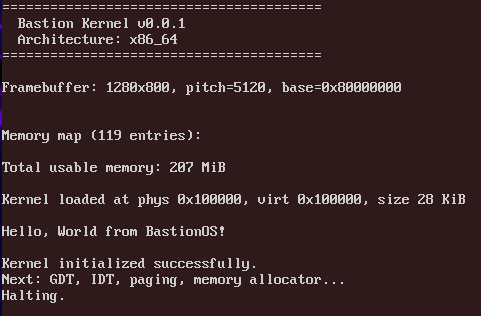
kernel_main is our c++ architecture-independent code, that get boot_info, validates it, reads framebuffer data, parses memory map, prints hello world and goes to infinit halt.
So, here Phase I is done. We have bootable kernel.
Configuration
A quick note on configuration.
I'm bad in Python so I asked claude to write me script, that reads configuration and generates config_generated.mk and config.h.
Then in makefile i add -include $(PROJECT_ROOT)/include/kernel/config.h to compiler argument. Like in Linux.